Welcome to the Interim Business Processes (IBPs) |
Interim Business Processes (IBPs) are temporary procedures for a process until all functionality is present in the system. IBPs may include step-by-step instructions and involve procedures that must be completed manually and/or outside of the system. The IBPs are part of a set of online documentation that also includes Procedure Help files and Quick Reference Guides. This information explains the Interim Business Processes.
New for 09/30/2020
The IBP files are regularly updated. This section lists IBP changes that were made in the most recent release.
New IBPs
No Updates
Retired IBPs
No Updates
Updated IBPs
No Updates
Using the Interim Business Processes (IBPs)
To locate information in the IBP files:
Click the Search button
 .
.
Type a keyword or phrase in the search text box and click the Search button. Results display ranked
in order of relevance. When you click on a result, the IBP file displays
in the main window.
Please note, the Navigation Pane,
located on the left-side of the application window displays the Table
of Contents (TOC) which contains books ( ). Clicking
the book reveals all the IBP files.
). Clicking
the book reveals all the IBP files.
Click the Print button  located in the toolbar.
Locating and Using the Procedure Help and Quick Reference Guide Files
Procedure Help file and Quick Reference Guides are also available online within the VaCMS but they are organized under a separate tab, as show below.
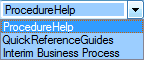
Locate the dropdown menu found at the left of the toolbar. Choose Procedure Help or Quick
Reference Guides and the left navigation displays the Procedure
Help, Interim Business Process or Quick Reference Guides Table of Contents
() and help files ( ).
).
Updated 09/30/2020