Interim Business ProcessRecording Reasonable Effort to Sell Real Property |
Current Functionality
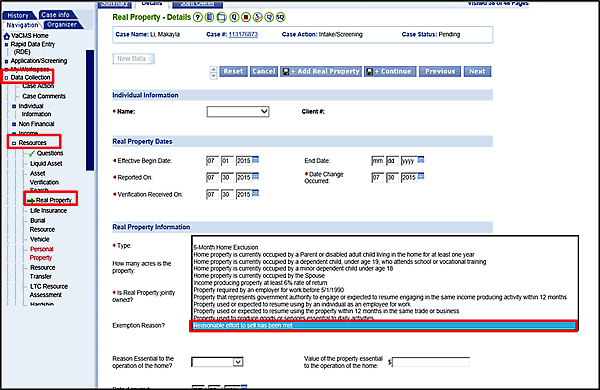
Currently, there are no rules in the VaCMS to determine whether a customer made a reasonable effort to sell Real Property per policy. Workers must make this determination according to policy outside the system. Once a true determination of this effort is made, you may exempt the property within the VaCMS. To do so, select Reasonable effort to sell has been met from the Exemption Reason dropdown menu on the Real Property page. To help you monitor the customer's reasonable effort to sell Real Property, reminders of key deadlines can be set using manual alerts in the VaCMS.
Interim Business Process for Recording Reasonable Effort to Sell Real Property
Outside of the VaCMS:
Determine whether the customer is making a reasonable effort to sell the property according to policy. There are no rules in the VaCMS to make this determination.
Within the VaCMS:
From the Left Navigation menu, go to Data Collection > Resources > Real Property.
For Exemption Reason? select Reasonable effort to sell has been met.
Note: Set up manual alerts as reminders for key deadlines related to monitoring the customer's reasonable effort to sell real property. For instructions on how to set up manual alerts, refer to the System-Generated Tasks and Reminders QRG.
Interim Business Process Expected End Date
TBD
Updated: 09/08/2015